
How to Write Your Cover Letter Using ChatGPT
Disclosure: Some of the links in this post are affiliate links. This means if you click on the link and purchase an item, I will receive an affiliate commission at no extra cost to you.
Writing a cover letter can feel surprisingly difficult, especially when you know you have the right experience but cannot find the right words. You open a blank document, stare at the screen, and wonder how to explain your value without repeating everything already written on your resume.
ChatGPT can make that process much easier, but only when you give it the right information and instructions. A vague request such as “write my cover letter” often produces a generic letter filled with phrases recruiters have seen countless times. A focused prompt can create something far more relevant, concise, and connected to the specific role.
The most effective approach starts with context. Give ChatGPT the job description, your key experience, and the company name. From there, you can improve the opening, connect your skills to the employer’s needs, remove robotic language, and make the final letter easier for a recruiter to scan.
Learning how to Write Your Cover Letter Using ChatGPT can save valuable time during a busy job search. It can also help you present your strongest qualifications without exaggerating your experience or making your application sound like it came from a template.
As you improve your applications, it is also worth developing skills that can expand your career options. 5 Lucrative Remote Skills You Can Learn in 2026 can help you identify practical skills that employers increasingly value.
Why Most Cover Letters Get Ignored
Most cover letters do not fail because candidates lack qualifications. They fail because recruiters cannot quickly see the connection between the candidate and the role. Recruiters skim applications. They look for relevance.
They want to know why your experience matches their needs without reading a long explanation. A cover letter that takes too long to understand can lose attention before the recruiter reaches your strongest qualifications. That is why learning how to Write Your Cover Letter Using ChatGPT is less about asking AI to do the writing for you.
It is about giving ChatGPT enough context to help you communicate your value clearly. A weak prompt often creates a generic letter. A specific prompt creates a focused one. The difference starts with the information you provide.
Read this next: Step by step guide on how to start Affiliate marketing in 2026
How to Write Your Cover Letter Using ChatGPT
Step 1: Give ChatGPT the Right Context
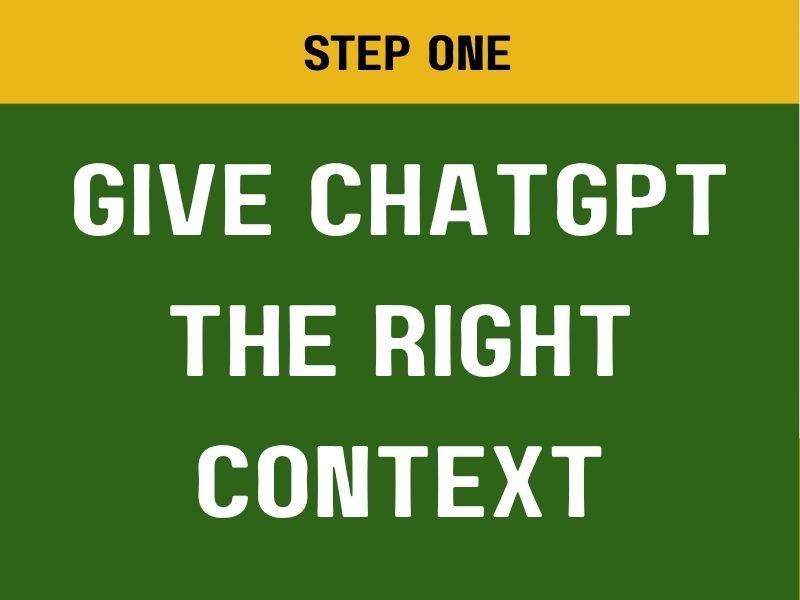
Many people make the same mistake at the beginning. They open ChatGPT and type:
“Write me a cover letter.”
That request sounds simple. It also leaves ChatGPT with almost nothing useful to work with. The result often sounds generic because the AI does not know which job you want, what experience you have, or which company you are contacting.
The images recommend a much better starting point. Do not begin with the writing. Begin with the context. Paste only three things into ChatGPT. The first is the job description. The second is your CV or key experience points.
Open this: 10 things you must do immediately after applying for a job (to avoid rejection)
The third is the company name. That information gives ChatGPT the material it needs to connect your background with the employer’s requirements. Think of it as giving the AI the ingredients before asking it to prepare the meal. Without the ingredients, the result will remain generic. With the right information, the writing becomes much more specific.
Why Context Comes First
Imagine a company wants someone with customer service experience, strong communication skills, CRM knowledge, and experience handling a high volume of inquiries. Your CV already contains some of those details. Your job description contains the rest.
ChatGPT can compare both pieces of information and identify the strongest connections. That creates a more relevant cover letter. You can also use this approach when preparing for remote roles.
6 FREE Websites That Gets You Hired FAST can help you find additional job-search opportunities after preparing your application materials. The key principle remains simple. Context first. Writing second.
Step 2: Use the Exact Base Prompt
Once you provide the job description, your experience, and the company name, you can give ChatGPT the main writing instruction.
Use this prompt:
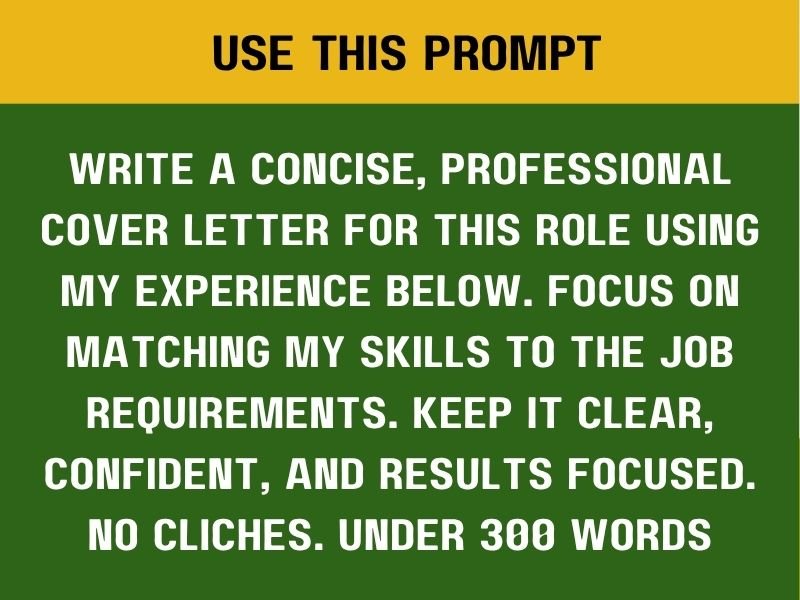
“Write a concise, professional cover letter for this role using my experience below. Focus on matching my skills to the job requirements. Keep it clear, confident, and results focused. No clichés. Under 300 words.”
This prompt works because it gives ChatGPT several clear instructions at once. First, it tells the AI to keep the cover letter concise. Second, it establishes a professional tone. Third, it tells ChatGPT to connect your experience with the specific role.
Fourth, it asks for confidence without unnecessary exaggeration. See this next: How to optimize your Linkedin profile using Chat GPT Finally, it creates a clear length limit. Those details make a major difference.
Why You Should Avoid Generic Prompts
A request such as “write my cover letter” gives ChatGPT too much freedom. It may create an opening like:
“I am excited to apply for this exciting opportunity at your organization.”
That sentence sounds harmless. It also says almost nothing. Recruiters have probably seen variations of it hundreds of times. The better prompt tells ChatGPT to focus on the actual role. That shifts the letter away from generic enthusiasm and toward relevance.
Bookmark this: 6 Powerful Chat GPT Prompts to help reduce your workload
Keep the Letter Under 300 Words
The image recommends a maximum of 300 words. That limit encourages ChatGPT to remove unnecessary explanations. It also makes the letter easier to skim.
A strong cover letter does not need to repeat your entire career history. Your resume already provides the detailed timeline. The cover letter should explain why your experience fits this specific opportunity.
That distinction keeps the document focused. If your application also needs a stronger resume, you can use 10 Powerful Chat GPT Prompts to Help You Rewrite Your Resume to improve the CV that accompanies your cover letter.
Step 3: Fix the Opening Paragraph
Your opening paragraph determines whether the recruiter wants to keep reading. Unfortunately, many applicants waste those first few lines. “Dear Hiring Manager, I am excited to apply…”
There is nothing technically wrong with that sentence. The problem is that it sounds predictable. It tells the recruiter that you want the job.
It does not explain why you fit the job. Come back to this: 9 FREE AI tools every remote worker should have in 2026
Use This Instead
The recommended prompt is:
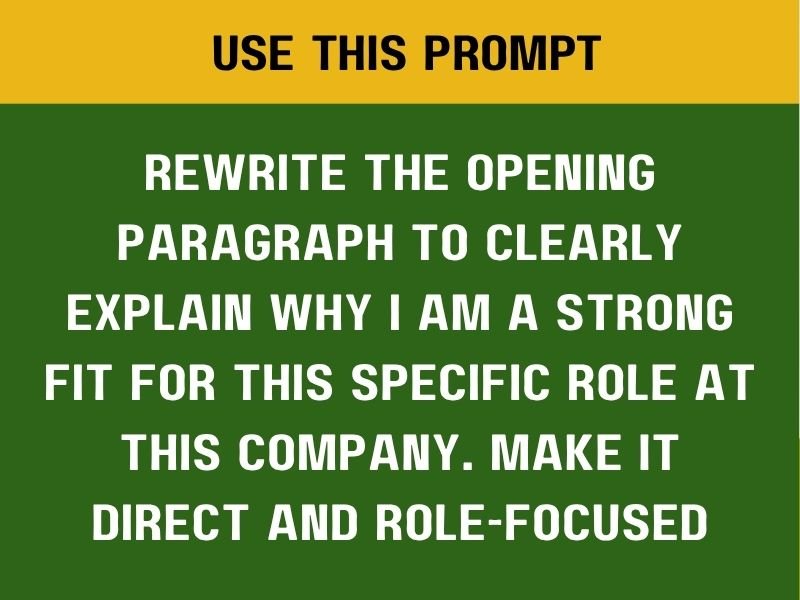
“Rewrite the opening paragraph to clearly explain why I am a strong fit for this specific role at this company. Make it direct and role-focused.”
This instruction changes the purpose of the opening. Instead of starting with excitement, you start with relevance. That means the recruiter sees your value sooner.
What a Strong Opening Should Do
A strong first paragraph should connect your background with the employer’s needs. Suppose a company wants a social media specialist who can improve engagement and manage content across several platforms. Your opening could mention your experience managing campaigns, producing content, and improving engagement.
The recruiter immediately understands the connection. That is much stronger than simply saying you are excited about the opportunity.
Pin this: 8 Powerful AI Prompts you can use for job search
Why Direct Writing Works
Recruiters often read quickly. They may review dozens of applications in one sitting. A direct opening respects their time. It also creates a stronger first impression. You do not need dramatic language. You need relevance. When using ChatGPT to help you Write Your Cover Letter Using ChatGPT, make that first paragraph earn the recruiter’s attention.
Step 4: Make the Cover Letter Sound Human
ChatGPT can create polished writing. Sometimes it creates writing that sounds too polished. The language may feel stiff.
The sentences may sound unnatural. The letter can start reading like AI wrote it instead of a real professional. Don’t lose this guide: 10 Skills AI can’t replace that you should be learning
Use This Prompt
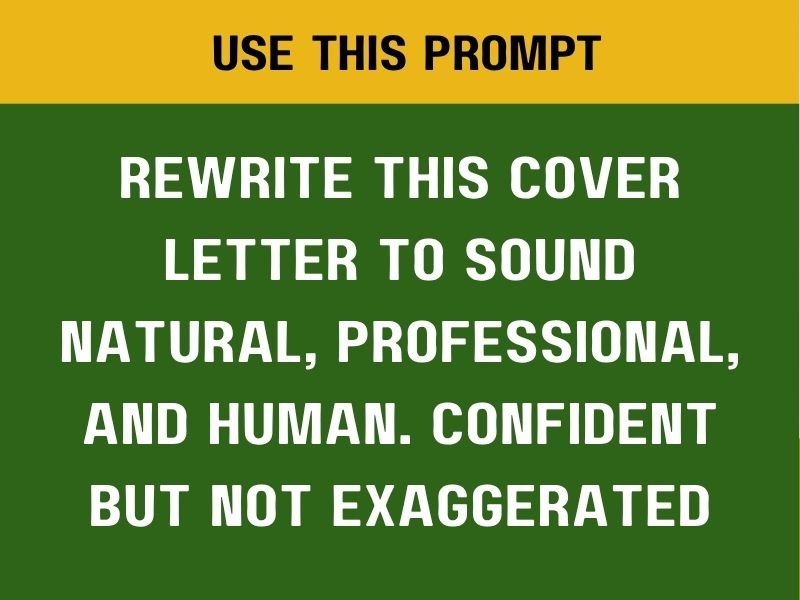
“Rewrite this cover letter to sound natural, professional, and human. Confident but not exaggerated.”
This instruction helps remove robotic language. It also encourages a more conversational professional tone. You still want the letter to sound polished. You simply do not want every sentence to sound like corporate marketing copy.
What Robotic Writing Often Looks Like
AI-generated cover letters may overuse phrases such as:
“I am uniquely positioned.”
“It uses I am thrilled to bring my exceptional expertise.”
“Passionate about leveraging my proven skill set.”
These phrases sound impressive at first glance. Too many of them make the letter feel artificial. Strong writing usually feels simpler.
Open this: 10 Websites to start learning Graphic Designs for FREESay what you did. Explain how it helped. Connect it to the role. Then move on.
Confidence Without Exaggeration
The prompt specifically asks for confidence without exaggeration. That distinction matters. You want ChatGPT to present your strengths clearly.
You do not want it invent achievements. Never allow AI to create numbers, responsibilities, certifications, or results that you cannot prove.
Your cover letter should strengthen your application. It should not create claims that could hurt you during an interview. If you are also learning how to use AI responsibly during your job search, 10 Skills AI Can’t Replace That You Should Be Learning can help you think about where human judgment remains important.
Step 5: Tighten the Letter for Fast Skimming
The final step in the images focuses on something recruiters do constantly. They read quickly. That means your cover letter must communicate its value without requiring several minutes of close reading. The recommended final prompt is:
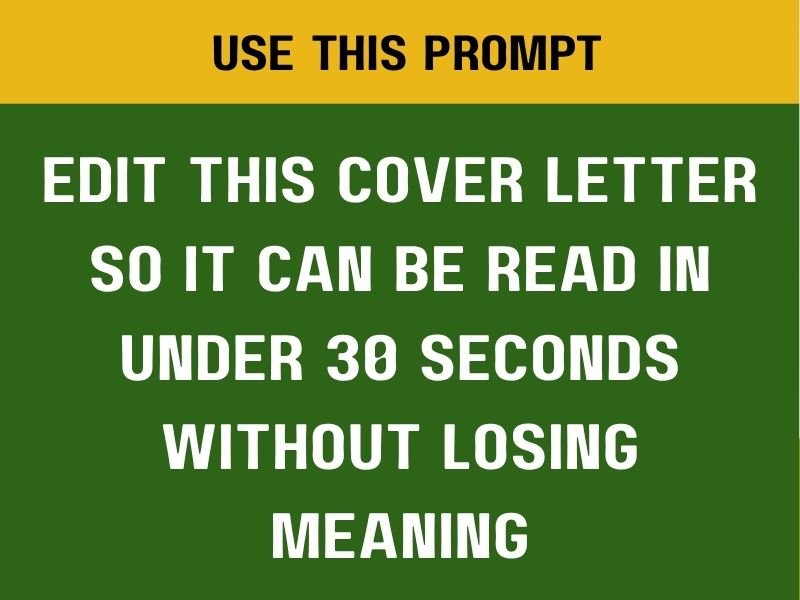
“Edit this cover letter so it can be read in under 30 seconds without losing meaning.”
The image reinforces the principle with three simple ideas. Short sentences. Clear value. Easy scan.
Why Skimmability Matters
A recruiter may begin by scanning your first paragraph. Then they may move to the middle. They may look for evidence of relevant experience.
Finally, they may check how clearly you communicate. Long paragraphs make that process harder. Shorter paragraphs create visual breathing room. Specific language also makes important information easier to identify. That does not mean every sentence should be extremely short. It means every sentence should have a purpose.
Read this: How to optimize your Linkedin profile using Chat GPT
Ask ChatGPT to Remove Unnecessary Words
You can follow the final prompt with an additional instruction:
“Remove repetitive sentences and unnecessary phrases while keeping the important evidence.”
This helps tighten the letter without stripping away substance. The goal is not making the cover letter as short as possible. The goal is making every sentence useful.
Pin this: 10 FREE AI Courses with Certificates you should take today
The Biggest Cover Letter Mistake
Many people assume a cover letter should demonstrate how passionate they are about the job. Passion can help. It is not the main purpose.
The images make the distinction clear. Cover letters are not primarily about passion, long explanations, or proving how much effort you put into applying. They are about fit and clarity. A good cover letter quietly answers one question:
“Why you, for this role?”
That question should guide every paragraph. Your experience should support your answer. It should connect to the job requirements.
Your opening should create interest. The language should remain human. Your closing should leave the recruiter with a clear reason to consider you.
Check this out: 5 Fixes Your LinkedIn Profile Needs NOW to Attract Recruiters
What Recruiters Need to See Quickly
Your cover letter should make the connection between your skills and the position obvious. Suppose the job requires customer relationship management. Your letter should mention relevant customer experience.
Suppose the role requires project coordination. Your letter should highlight coordination experience. Suppose the company needs someone who can work independently in a remote environment.
Your letter should demonstrate that experience. The connection should feel natural. That is why the job description matters so much.
ChatGPT cannot make a strong connection unless you provide the information it needs. Open this: 10 APPS that teaches tech skills for FREE
Use Your CV as Evidence
Your CV provides the raw material. The cover letter provides the context. Do not treat the two documents as separate stories. They should support each other. If your resume says you increased social media engagement, your cover letter can explain why that experience makes you suitable for a marketing role. If your resume shows that you managed multiple projects, your letter can connect that experience to a project coordinator position.
The cover letter should make the recruiter’s job easier. It should highlight the most relevant evidence instead of forcing the recruiter to search for it.
Match Your Experience to the Employer’s Needs
A good cover letter should never feel like a second copy of your resume. Your resume explains your career history. Your cover letter explains why that history makes you a strong candidate for this particular role.
That distinction changes how you should use ChatGPT. Instead of asking the tool to rewrite everything, give it a clear job description and your strongest experience. Then ask it to connect the two. The base prompt already does this:
“Write a concise, professional cover letter for this role using my experience below. Focus on matching my skills to the job requirements. Keep it clear, confident, and results focused. No clichés. Under 300 words.”
The phrase “matching my skills to the job requirements” does most of the work. It forces the letter to stay relevant. Your goal is not to mention every skill you possess. Focus on the abilities that solve the employer’s immediate problems.
Identify the Employer’s Problems
Every job description contains clues about what the employer needs. A company searching for a customer support specialist may need someone who can handle high volumes of inquiries, resolve complaints, and maintain accurate records.
A company hiring a social media manager may need someone who can create content, monitor performance, and improve engagement. A business looking for an administrative assistant may need someone who can manage calendars, organize documents, and coordinate communication.
Your cover letter should connect your experience to those needs. ChatGPT can help identify those connections when you provide the right context. You can add this instruction after the base prompt:
“Identify the three most important problems this role needs the successful candidate to solve, then connect my experience to those needs naturally in the cover letter.”
That gives the letter a stronger purpose. It becomes less about describing you and more about showing how you can help the company.
Avoid Repeating the Job Description
Copying phrases from a job description word for word does not create a strong cover letter. It can make your application feel mechanical. Instead, use the job description as a guide. Look for its most important requirements. Then connect those requirements to your actual experience. For example, a job description might ask for:
“Strong stakeholder communication and project coordination skills.”
Your cover letter could explain how you coordinated communication between clients, internal teams, and external partners while keeping projects on schedule. That creates a natural connection. You are using the employer’s language without simply copying the advertisement.
Remove Clichés
The images specifically warn against clichés. Many cover letters contain phrases such as:
“I am a hard-working individual.”
“Passionate about this opportunity.”
“An excellent team player.”
“I believe I would be a great fit.”
These statements do not provide much evidence. Almost every applicant can make the same claims. A better strategy involves showing the qualities through experience.
Instead of saying you are organized, explain how you managed competing deadlines. Do not say you communicate well, describe how you coordinated communication across teams. Instead of saying you are hardworking, highlight a measurable result you achieved. Evidence is stronger than adjectives.
Use ChatGPT to Remove Fluff
You can ask ChatGPT to identify unnecessary language before submitting your application. Try this prompt:
“Review this cover letter and remove clichés, filler phrases, repetition, and unnecessary explanations. Keep the strongest evidence and maintain a confident professional tone.”
This gives the AI a specific editing task. The goal is not to make the letter lifeless. The goal is to remove anything that does not strengthen your application. Every sentence should either establish relevance, provide evidence, or reinforce your fit.
Make the Closing Useful
The closing paragraph should not undo the work of the opening. Many applicants finish with several generic sentences about being excited to hear from the company. You can keep the closing simple. A strong ending reinforces your interest and leaves the recruiter with a clear impression of your value.
You can ask ChatGPT:
“Rewrite the closing paragraph to sound confident, professional, and concise. Reinforce my fit for the role without using clichés or sounding desperate.”
The result should feel natural. You are showing interest without begging for attention.
Check the Letter Against the Job Description
Before submitting your application, perform one final review. Give ChatGPT the job description and the completed cover letter. Then use this prompt:
“Compare this cover letter with the job description. Identify the strongest matches, missing requirements, vague claims, and irrelevant information. Then suggest specific improvements without inventing experience.”
This step can catch problems that are easy to miss. Maybe the letter focuses heavily on one skill while the employer cares more about another.
Perhaps an important requirement never appears. You might also discover that a paragraph contains general statements without evidence. A final comparison can make the application more focused.
Make Sure the Letter Still Sounds Like You
ChatGPT can improve structure. It can improve clarity. It can improve grammar. Your voice still matters. Read the completed letter out loud. Notice any phrase you would never normally say. Remove awkward wording.
Replace overly formal phrases with natural language. The strongest AI-assisted application still sounds like a real person wrote it. You want professional communication. You do not want robotic perfection.
Never Let ChatGPT Invent Your Experience
This rule matters throughout the entire process. Never allow AI to create achievements you did not accomplish. Do not add fake numbers.
Never claim software experience you do not have. Do not invent certifications. Never exaggerate your responsibilities. Your cover letter should remain completely accurate. Instead, give ChatGPT more information about genuine accomplishments. Small results can become useful evidence when you explain them clearly. Perhaps you reduced customer response times. Maybe you organized hundreds of records. You could have improved a reporting process or supported a successful campaign.
Real details make the letter stronger. That is why it helps to improve your resume before sending applications. 10 Powerful Chat GPT Prompts to Help You Rewrite Your Resume can help you strengthen the document that supports your cover letter.
A Simple 45-Second Workflow
You can turn the entire process into a short workflow. Start by giving ChatGPT the job description, your CV or key experience, and the company name. Then paste the exact base prompt:
“Write a concise, professional cover letter for this role using my experience below. Focus on matching my skills to the job requirements. Keep it clear, confident, and results focused. No clichés. Under 300 words.”
Review the opening paragraph. Ask ChatGPT to make it directly explain why you fit the specific role. Then review the tone. Ask ChatGPT to make the letter sound natural, professional, and human. Finally, tighten the letter for skimming.
Use:
“Edit this cover letter so it can be read in under 30 seconds without losing meaning.”
This workflow keeps the process focused. You are not asking ChatGPT to generate endless versions. You are giving it targeted jobs to perform.
The Biggest Lesson
Many people think cover letters require long explanations. They do not. They also do not require dramatic declarations of passion. The strongest cover letters communicate fit. They show the recruiter why your experience connects to the role. Make your value easy to understand.
They stay concise. and sound human. The entire process becomes much easier when you stop asking ChatGPT to “write a cover letter” and start giving it specific instructions.
That is the real advantage of learning how to Write Your Cover Letter Using ChatGPT. You are not handing over your career story to AI. You are using AI as an editor, strategist, and writing assistant.
Final Thoughts
A strong cover letter quietly answers one question: Why you, for this role? Everything else should support that answer. Give ChatGPT the right context. Match your experience to the job requirements. Make the opening direct.
Remove clichés. Keep the language human. Tighten the final version for quick reading. Then check every claim for accuracy before submitting. You do not need a complicated system. You need clear information and clear instructions. Once you understand that, writing a relevant cover letter becomes much faster and much less stressful.






5 Comments