
6 Powerful Chat GPT Prompts to help reduce your workload
Disclosure: Some of the links in this post are affiliate links. This means if you click on the link and purchase an item, I will receive an affiliate commission at no extra cost to you.
Most people think ChatGPT isn’t good at writing. In reality, the problem usually starts with the prompt. Many people open ChatGPT and type something like, “Write this for me,” “Make this better,” or “Rewrite this.” Then they wonder why the answer feels generic, repetitive, or nothing like what they wanted.
Think about it for a moment. If you hired a new assistant today and simply said, “Do it,” they would probably have dozens of questions. Who is this for? What is the goal? How should it sound? How long should it be? What should they avoid?
ChatGPT works much the same way. The more context you provide, the better it understands the job. When you tell it your audience, your goal, your preferred tone, and the result you want, the quality improves dramatically.
Instead of treating ChatGPT like a magic button, think of it as a junior assistant. It can work incredibly well, but only when you give it clear directions.
In this guide, I’ll show you Powerful Chat GPT Prompts to help reduce your workload. Each one replaces a vague prompt with a practical one that produces clearer, more useful results. Whether you write blog posts, emails, reports, social media content, or marketing copy, these prompts can save hours every week.
If you’re just getting started with AI, you may also enjoy 9 FREE AI Tools Every Remote Worker Should Have in 2026, where I share more tools that can make everyday work much easier.
6 Powerful Chat GPT Prompts to help reduce your workload
1. Stop Asking ChatGPT to Think for You
Do not just tell ChatGPT “WRITE FOR ME“
This prompt tells ChatGPT almost nothing. It doesn’t tell the model who you’re writing for, what your goal is, the tone you want, how long the content should be, or what success looks like.
Now imagine giving that same instruction to a new employee. You walk into the office and simply say, “Write for me.” The first question they’ll probably ask is, “Write what?” Without those details, they can only guess.
Open this next: 5 Lucrative Remote Skills you can learn in 2026
ChatGPT works in much the same way. Many people assume AI magically understands what they’re thinking. It doesn’t. Every response starts with the information you provide. When your instructions lack context, the output becomes generic because the model has to fill in the missing details. Instead of expecting ChatGPT to make every decision, tell it exactly what role it should play.
Use This Prompt Instead
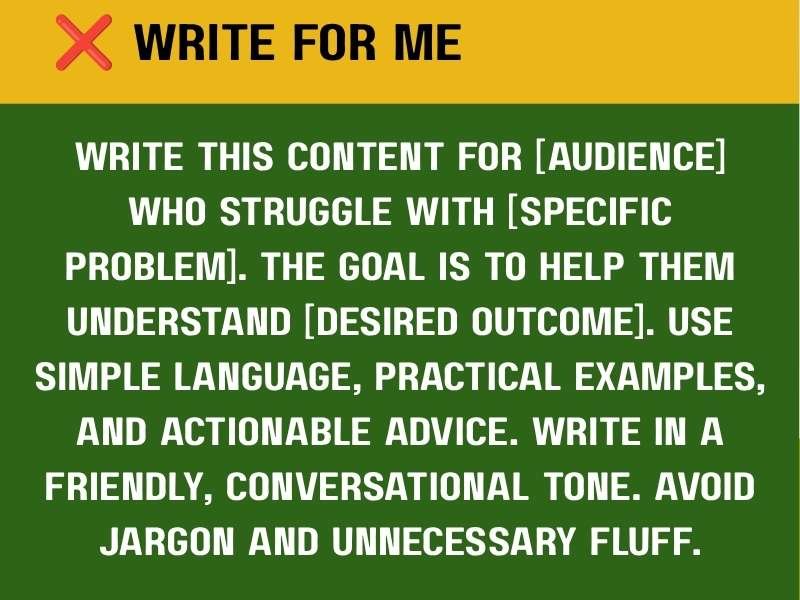
Notice how different this prompt feels. Instead of asking ChatGPT to figure everything out, you’ve already answered the biggest questions. That single change can produce dramatically better content because the model has a clearer direction from the start.
Why This Works
Context creates quality. When ChatGPT knows exactly who it’s helping, it can choose better vocabulary, examples, explanations, and structure.
For example, imagine you want an article about budgeting. A vague prompt like “Write about budgeting” could generate something useful, but the result would probably feel generic.
If you’re using AI regularly, you’ll also enjoy 8 Powerful AI Prompts you can use for job search, where I share other tools that save hours every week.
2. Stop Being Vague About the Result
Don’t just tell ChatGPT, “REWRITE THIS.” Rewrite it how?
Should it become shorter or longer? Should it sound friendlier, more persuasive, or more professional? Do you want it optimised for search engines or made more engaging?
The word “rewrite” leaves too many unanswered questions. ChatGPT has no idea which version you actually want. That’s why so many people receive responses that technically rewrite their content but completely miss their expectations.
Instead of simply stating the action, describe the result you’re trying to achieve. Think about the destination before asking for directions.
Come back to this: 10 APPS that teach tech skills for FREE to explore more ways to build useful skills.
Use This Prompt Instead
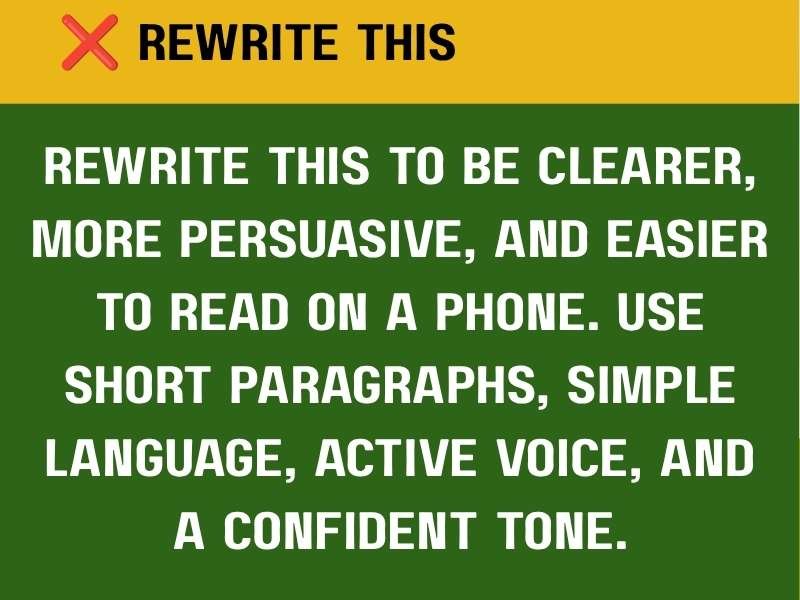
Now the goal becomes crystal clear. Instead of simply rewriting, ChatGPT now understands that it should:
- Improve readability
- Increase persuasion
- Shorten paragraphs
- Remove fluff
- Keep the same message
- Maintain a confident tone
Those instructions completely change the final output.
See this: 9 Websites that teach you EXCEL courses for FREE
Why This Works
Every writing project has a purpose. Sometimes you want readers to learn, buy, click or to finish reading. Different goals require different writing styles. Imagine you’re writing a LinkedIn post. A vague rewrite may leave the opening exactly as weak as before. However, a detailed prompt tells ChatGPT where to focus.
If you’re creating content for work every day, combine this prompt with 6 FREE Websites That Gets You Hired FAST to build stronger applications, resumes, and professional profiles while saving hours each week.
3. Stop Treating ChatGPT Like a Mind Reader
Do not just tell ChatGPT “MAKE THIS BETTER“
According to who? Do you want it to sound more natural, you want it to rank on Google or for readers to stay longer on the page? Should it become shorter? Should it sound more persuasive? The word “better” means something different to everyone.
Unfortunately, ChatGPT cannot guess which version you have in mind.
Bookmark this: 7 Websites to start learning video editing for FREE
That’s why many people receive an answer that feels different but not necessarily improved. Instead of asking for “better,” explain exactly what should improve. Treat ChatGPT like a writer you’re giving feedback to. Good editors don’t say, “Make it better.” They explain what they want changed.
Use This Prompt Instead
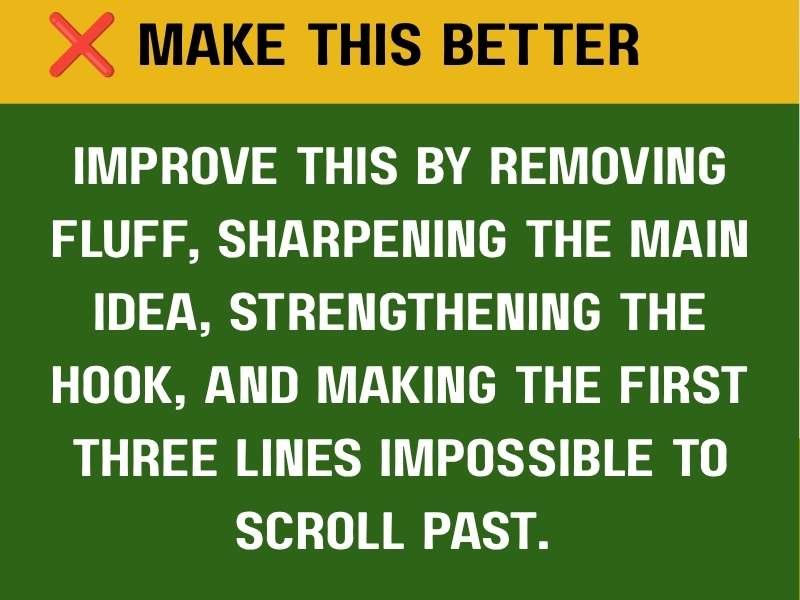
Now ChatGPT has a clear editing checklist. Instead of randomly changing words, it focuses on:
- Removing unnecessary sentences
- Strengthening the opening
- Improving clarity
- Keeping readers interested
- Preserving the original meaning
The difference is enormous.
Why This Works
Editing is much easier when every improvement has a purpose. Think about social media. People decide within seconds whether they’ll keep reading. If the first few lines fail to capture attention, many readers simply keep scrolling. That’s why your prompt should mention the opening.
If you’re writing long-form content, this prompt pairs perfectly with 10 Skills AI Can’t Replace That You Should Be Learning, especially if you want your writing to sound more human while using AI responsibly.
4. Stop Skipping Structure
Do not just tell ChatGPT “WRITE A POST ABOUT (TOPIC)”
Technically, ChatGPT can do that. The problem is that it has to invent the structure on its own. Most of those problems happen because the prompt never explained how the content should be organized.
Structure controls quality. Professional writers rarely begin writing without knowing the outline first. They decide what readers should learn first, what comes next, and how the article should finish. You should give ChatGPT that same roadmap.
Use This Prompt Instead
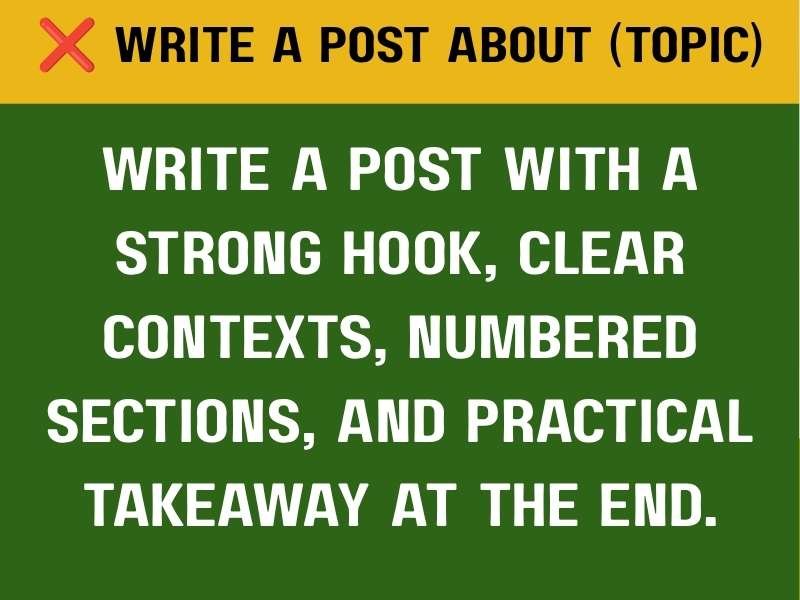
Notice what happened. Instead of simply asking for an article, you’ve designed the entire reader experience. The AI now understands the flow before writing the first sentence.
Why This Works
Readers love predictable structure. They want to know where they’re going. A well-organized article feels easier to read because every section naturally leads into the next one. Even if you’re writing emails or presentations instead of blog posts, structure still matters.
A good structure reduces confusion. Before asking ChatGPT to write anything, spend one minute deciding what sections you actually want.
If you’re creating articles regularly, you’ll find this approach especially useful alongside 20 FREE Resources to Learn Cybersecurity, which follows a clear, logical structure that keeps readers engaged from beginning to end.
5. Stop Ignoring Tone and Audience
Do not just tell ChatGPT “WRITE PROFESSIONALLY“
That sounds like a good instruction. The problem is that “professional” means something different to everyone. One person imagines a formal business report.
Another thinks of an academic paper. Someone else pictures a friendly LinkedIn article. ChatGPT has no way of knowing which version you want. As a result, the writing often sounds stiff, robotic, or filled with unnecessary jargon. If your audience can’t understand what you’ve written, even the most accurate content loses its value.
Use This Prompt Instead
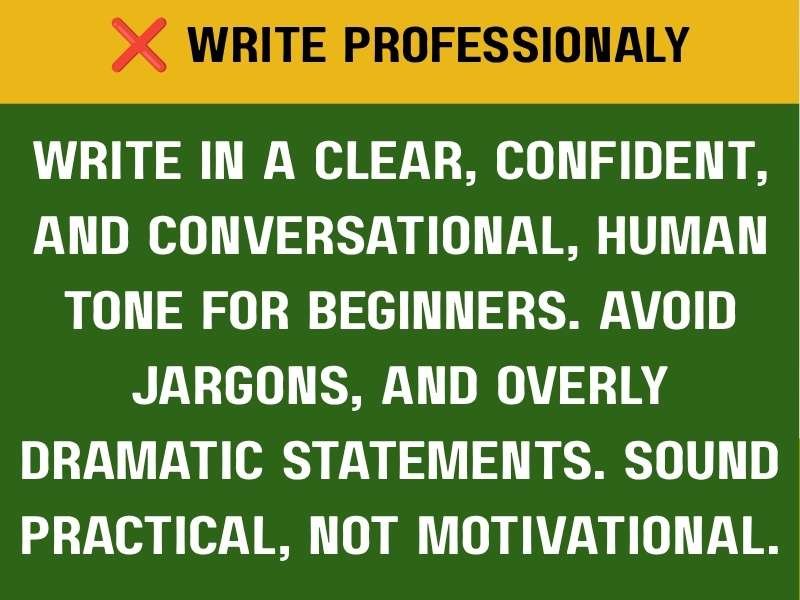
That prompt gives ChatGPT a personality. Instead of guessing, it now understands exactly how the writing should feel. The response becomes easier to read because every sentence serves the audience instead of trying to impress them.
Why This Works
Every audience reads differently. A cybersecurity beginner needs simpler explanations than an experienced security engineer, while a parent searching for craft ideas needs a different tone from a CEO reading a business proposal.
You can also adjust your tone based on the platform. LinkedIn may require a confident and educational voice, while Instagram captions often feel lighter and more conversational. Blog posts usually need a balance between authority and friendliness, while emails may need to sound personal while remaining professional.
Instead of expecting ChatGPT to guess the right tone, describe it clearly in your prompt. Tell it how you want the content to sound and who will be reading it. The closer the tone matches your audience, the more natural and effective the content feels.
If you’re creating online content consistently, you’ll also enjoy 8 SMART Ways to Find Clients on X (Twitter) and Get Hired FAST, where clear communication plays a huge role in attracting opportunities.
6. Stop Asking for Magic. Ask for a System
Do not just tell ChatGPT “MAKE THIS GO VIRAL“
Everyone wants content that reaches thousands of people. Unfortunately, there isn’t a prompt that can guarantee virality, and no AI can promise that outcome.
Content succeeds for many reasons. It needs to solve a real problem, hold the reader’s attention, and encourage people to keep reading or sharing. Instead of asking ChatGPT for a magical outcome, ask it to improve the elements you can actually control.
Think about the structure, the reader, and reader retention. Give ChatGPT clear instructions about how you want the content organised, who it should speak to, and what will keep the audience engaged from beginning to end. Those factors matter much more than hoping for viral luck.
Use This Prompt Instead
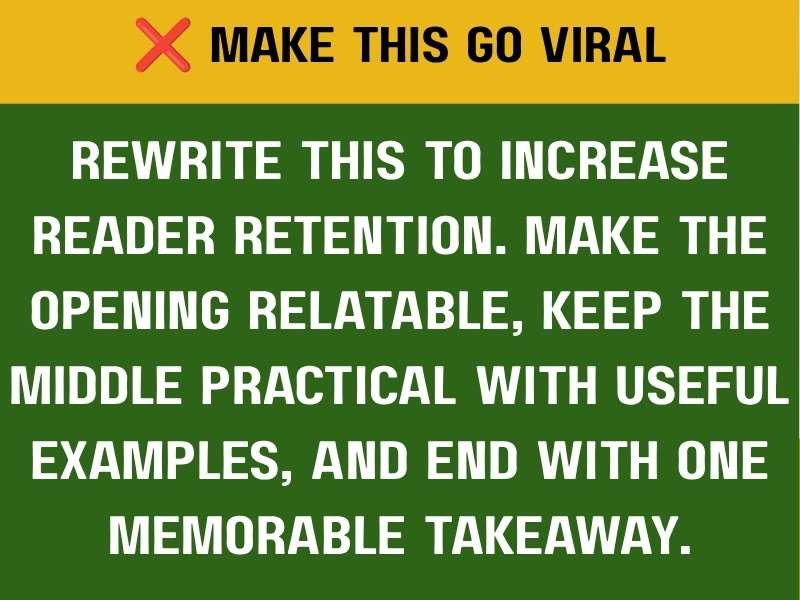
Now ChatGPT has a practical objective. It isn’t trying to chase an unpredictable result. Instead, it’s improving the factors that often lead to better-performing content.
Why This Works
Successful content usually follows a simple pattern: the opening grabs attention, the middle delivers genuine value, and the ending leaves readers with one clear action. That’s a system. Whenever you ask ChatGPT to improve retention, you’re encouraging it to focus on the reader’s experience. It can then create stronger transitions between ideas, reduce unnecessary filler, keep explanations practical, and build curiosity that encourages readers to continue.
A Simple Prompt Formula You Can Reuse
Whenever you’re unsure what to write, use this framework. Start with the role you want ChatGPT to play. For example, you could say, “Act as an experienced content writer.” Next, define your audience by explaining who the content is for. You might say, “Write for beginners who have never used AI before.”
Then explain the goal. What should the reader achieve after reading the content? For example, “Help them understand how to create better prompts.” You should also define the tone. Tell ChatGPT whether you want the content to sound friendly, practical, conversational, and confident.
Next, provide the structure. Explain how you want the content organised, such as using a strong hook, numbered sections, practical examples, and a memorable conclusion.
Finally, add your rules. Tell ChatGPT what to avoid, such as jargon, unnecessary repetition, or long paragraphs. Including these six elements can transform an average prompt into one that produces stronger and more consistent results.
Final Thoughts on Powerful ChatGPT Prompts to Help Reduce Your Workload
Many people believe ChatGPT writes generic content. More often, generic prompts create generic responses. The quality of your output usually reflects the quality of your instructions.
When you provide clear context, define your audience, explain the desired outcome, choose the right tone, and give ChatGPT a logical structure, the difference becomes obvious. You’ll spend less time rewriting, your content will sound more natural, and your workflow can become much faster.
Remember one simple idea: don’t ask ChatGPT to read your mind. Guide it the same way you would guide a junior assistant joining your team for the first time. Clear instructions create clearer results.
The next time you’re about to type, “Write this for me,” stop for a moment. Spend another thirty seconds adding context, defining the audience, describing the outcome, and outlining the structure. Those extra details can save hours of editing later. The best prompt isn’t always the longest one. It’s the one that leaves the fewest questions unanswered.






14 Comments