
How to Build Your Portfolio in 15 Minutes
Disclosure: Some of the links in this post are affiliate links. This means if you click on the link and purchase an item, I will receive an affiliate commission at no extra cost to you.
Building a portfolio can feel like a huge project when there are no clients, polished case studies, or years of experience to showcase. However, a simple portfolio can still make your skills easier to understand and give potential clients something concrete to review.
Learning how to build your portfolio in 15 minutes starts with focusing on one clear skill. A virtual assistant can showcase inbox organization, calendar management, research, or lead generation. A content writer can display sample articles, email copy, or social media captions. Meanwhile, a designer can present selected graphics that demonstrate creativity and consistency.
The goal does not involve creating a complicated website. Instead, a clean presentation can organize the most relevant information in a format that feels professional and easy to review. Canva can provide a convenient starting point, especially when a presentation-style layout allows each project to receive its own section.
A strong portfolio should explain the service, demonstrate sample work, and make contact simple. Even a fictional practice project can demonstrate problem-solving ability when it clearly identifies the challenge, explains the solution, and shows the finished result. Genuine client work, testimonials, and measurable outcomes can replace practice samples as experience grows.
Most importantly, avoid waiting for the perfect portfolio before searching for opportunities. A useful first version can open doors while providing room for improvement. For additional ideas about skills that can support freelance work, explore 5 Lucrative Remote Skills You Can Learn in 2026.
How to Build Your Portfolio in 15 Minutes
Start With One Clear Skill

A fast portfolio starts with one decision: choose the skill that needs showcasing. A scattered portfolio makes clients work harder, while a focused portfolio makes the offer easier to understand.
Virtual assistance provides a simple example. A beginner can highlight inbox organization, calendar management, research, lead generation, customer support, and social media assistance. A content writer can feature blog posts, email sequences, website copy, product descriptions, or social captions. Meanwhile, a graphic designer can present selected branding pieces, social graphics, presentations, or promotional materials.
The goal behind how to build your portfolio in 15 minutes does not involve displaying every skill ever learned. Instead, the portfolio should communicate one professional direction clearly.
Choose the service most likely to attract the desired clients. Then, gather examples that support that service. This approach creates a much stronger first impression.
For instance, a virtual assistant portfolio should look like a virtual assistant portfolio. A social media portfolio should emphasize content calendars, captions, campaign concepts, and analytics. A designer’s portfolio should prioritize visual work.
A useful career foundation can come from 5 Lucrative Remote Skills You Can Learn in 2026. Those skills can provide ideas for choosing a service that already has demand. Once the core skill feels clear, the portfolio becomes much easier to assemble.
Open Canva and Choose a Presentation
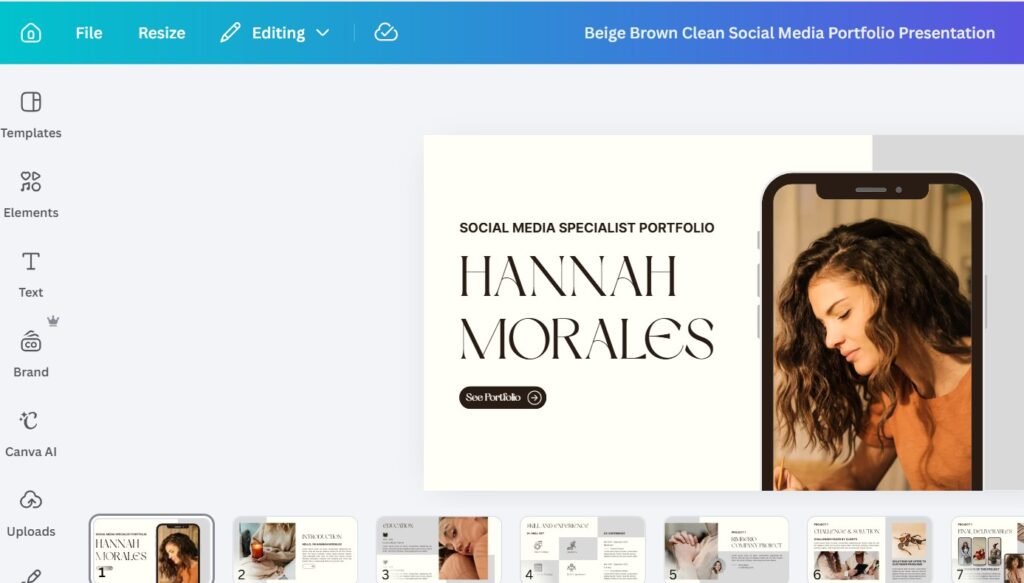
Canva can make how to build your portfolio in 15 minutes much more realistic for beginners. A presentation format works particularly well because every slide can focus on one part of the professional story.
Open Canva and search for “Presentation.” Choose a clean template with readable fonts, generous spacing, and simple visual elements. Avoid templates that contain excessive graphics, complicated animations, or distracting decorations.
The portfolio should feel professional before anyone reads a single sentence. Select a layout that allows five to seven slides. That structure provides enough space for a short introduction, services, examples, contact details, and a little proof.
A clean design also makes future updates easier. New samples can replace old ones without redesigning the entire document. The same principle applies when building a career around digital skills. 10 Websites to Start Learning Graphic Designs for FREE can help beginners improve visual presentation skills that support stronger portfolios.
Remember one important rule: design should support the work. The portfolio itself should never become the main attraction.
Create a Simple Introduction Slide
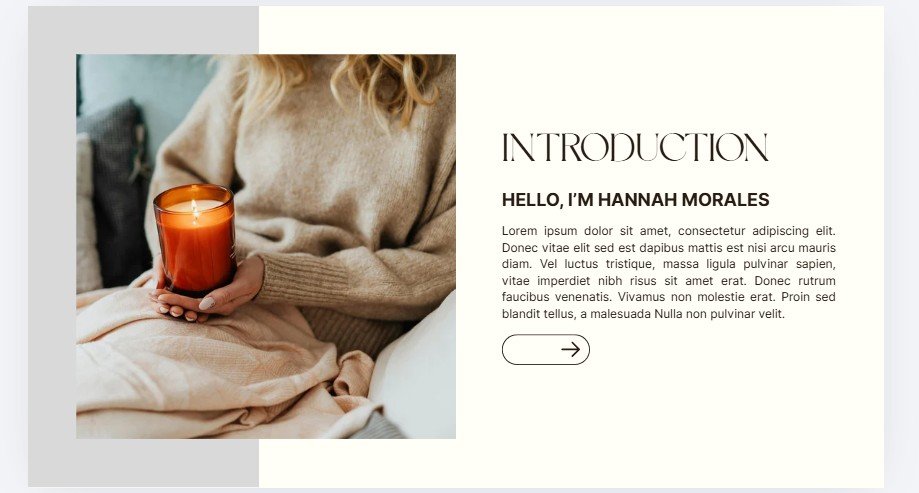
The opening slide should quickly explain your professional identity. Include your name, primary service, audience or type of client you serve, and a short value statement.
For example:
“Ijeoma — Virtual Assistant Helping Founders Stay Organised and Productive.”
That sentence immediately answers three important questions: who provides the service, what service they provide, and who benefits from it. A longer biography can wait. The introduction does not need a full life story, extensive education history, or every previous job. The portfolio should focus on what makes the service useful to a potential client. A short professional statement works better than a long paragraph. For example:
“I help small businesses manage administrative tasks, organise workflows, and stay on top of daily operations.”
That wording creates context for everything that follows. Professionals exploring broader technology paths can also strengthen their practical knowledge through 10 APPS That Teaches Tech Skills for FREE.
The first slide should make the rest of the portfolio feel predictable. The viewer should understand what type of work comes next and why the portfolio is relevant to their needs.
Add a Services Slide
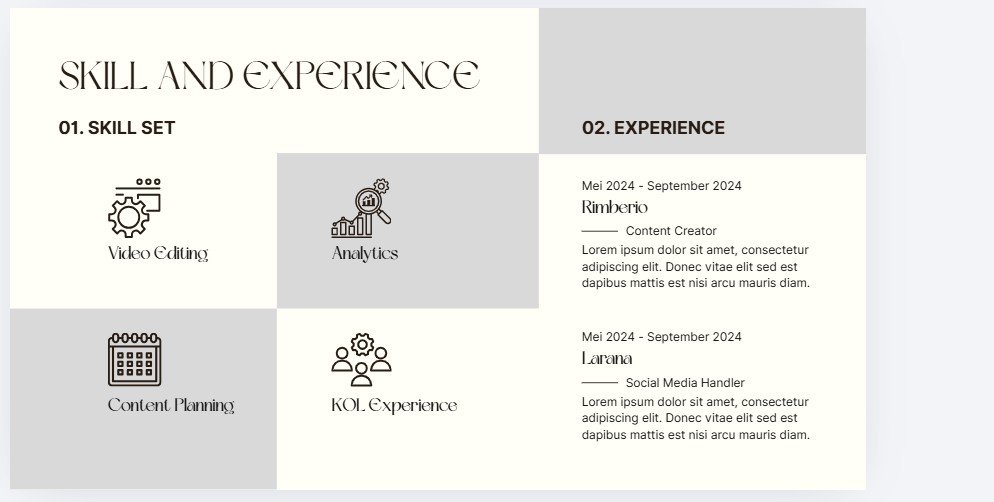
The next slide should answer a straightforward question: What can this professional actually do? Keep the answer specific. A virtual assistant might list email management, calendar scheduling, research, customer support, data entry, and social media assistance.
A content writer could include blog writing, website copy, email marketing, product descriptions, and content briefs. A graphic designer might feature social media graphics, presentation design, brand assets, promotional materials, and digital templates.
The service list should match the portfolio examples. That connection matters because listing ten services while showing only two unrelated samples can weaken confidence. A shorter list with strong supporting examples usually creates a better impression.
The portfolio should also reflect the type of work being pursued. Someone targeting remote administrative roles can learn more through 10 Websites to Learn Data Entry for FREE With Certificates and then showcase related practice work.
Keep the services slide easy to scan. Short phrases work better than long descriptions, especially when the viewer needs to understand the professional’s capabilities quickly.
Create a Sample Project
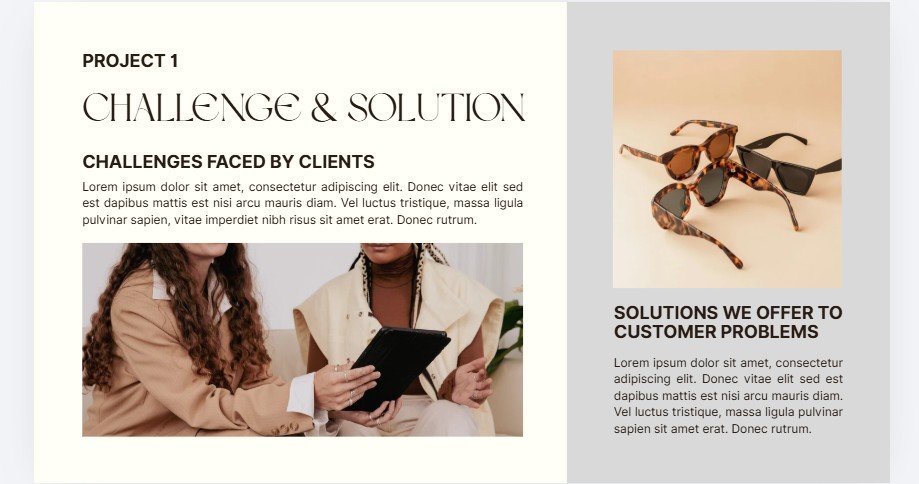
One example can demonstrate ability, while two examples can demonstrate range. The second project should support the same core service while showing another capability.
Calendar management works well for a virtual assistant. Create a fictional weekly schedule that includes meetings, deadlines, reminders, recurring tasks, and priority blocks. Then, explain the thinking behind the organisation. For example:
Challenge: The business owner has overlapping meetings and inconsistent planning.
Solution: Group meetings by priority, add preparation blocks, reserve follow-up periods, and protect focused work time.
That example shows organisation rather than simply claiming to have the skill.
For content creators, a second sample could involve a thirty-day content calendar. A designer could create another visual concept, while a project coordinator could present a sample project timeline. A data professional might include a simple dashboard.
Learning project organisation can also support this process through 12 Websites to Start Learning Project Management for FREE.
The key is to show how a problem is approached and solved. Each project should give potential clients a clear view of your thinking, process, and practical ability.
Add a Second Sample Project
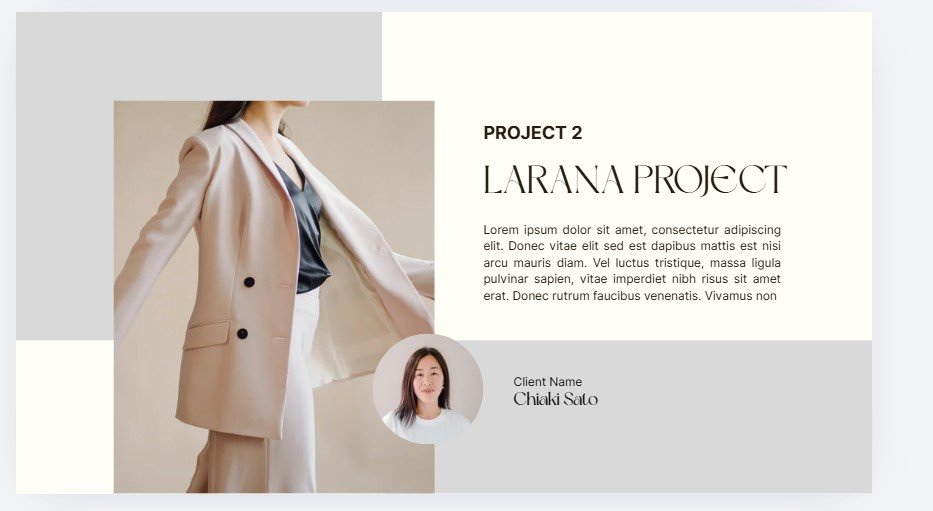
The sample project can become one of the strongest parts of your portfolio. A practice project can work even before your first client arrives, so waiting for paid experience does not need to delay portfolio building.
Start by choosing one realistic business problem, then create a sample solution that demonstrates how you would handle it. For a virtual assistant, consider inbox organisation. Suppose a fictional founder receives dozens of emails every day. Your sample project could show categories such as:
Urgent
Clients
Finance
Newsletters
Follow-Up
Then explain the solution briefly.
Problem: The founder struggles to find important messages.
Solution: Organise the inbox into folders, apply priority labels, and create a simple follow-up system.
Add a screenshot, diagram, mockup, or other visual representation to make the project easier to understand. The goal is to show how your skill works in practice rather than simply claiming that you have the skill.
For someone moving towards digital roles, 20 FREE Resources to Learn Cybersecurity can provide ideas for technical learning and practice projects that may eventually strengthen a portfolio.
Label practice work honestly. A sample project should never pretend to represent a real client. That transparency builds credibility and helps potential clients understand exactly what they are viewing.
Explain the Thinking Behind Each Sample
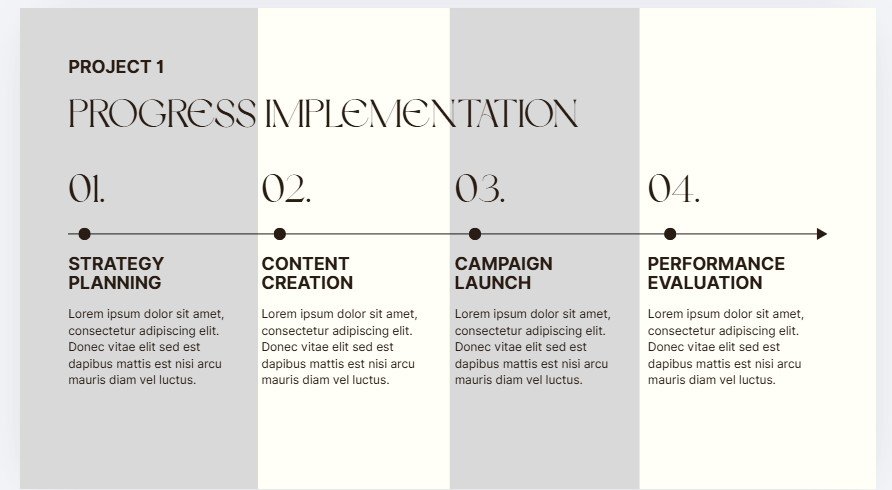
A portfolio should demonstrate more than finished files. Clients also want to understand the reasoning. That is why each project can include three short sections:
The Problem
The Approach
The Result
For practice projects, replace “result” with the intended outcome.
For example:
The Problem: A business owner loses track of client emails.
The Approach: Create folders, labels, and priority rules.
The Intended Result: Faster access to important messages and better follow-up.
That format makes the work easier to understand. It also demonstrates strategic thinking. The portfolio becomes stronger when every example tells a small story.
For someone pursuing freelance work, understanding how to present value matters just as much as learning the skill itself. How to Make Your Current Skill More Valuable and Make Money Without Learning a New One offers useful ideas for positioning existing abilities more effectively.
A client should finish each sample knowing what happened, why it mattered, and what skill the example demonstrates.
Keep the Portfolio Short
A common beginner mistake involves adding too much. Ten samples may sound impressive, but clients rarely need to see every piece of work. Five strong slides can communicate more than twenty cluttered pages.
Focus on quality. Choose the strongest examples. Remove weak projects. Delete repetitive screenshots. Avoid paragraphs that explain obvious details. A clean portfolio allows a busy client to understand the offer within seconds.
That principle also matters during client acquisition. 8 SMART Ways to Find Clients on X (Twitter) and Get Hired FAST can help turn a polished portfolio into a practical outreach asset.
The portfolio should support outreach rather than become a giant project that never gets finished. Speed matters because the purpose involves getting into the market.
Add a Contact Slide
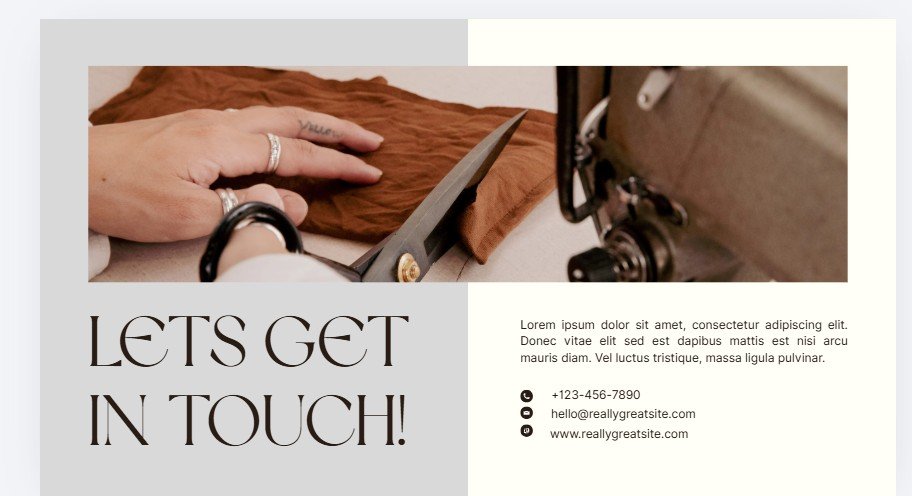
The final slide should make communication easy. Include a professional email address and add LinkedIn when it is relevant to the type of work you want. WhatsApp can also be useful when it supports your target audience, while Instagram may make sense for creative services.
Keep the layout simple. For example:
Email: hello@example.com
LinkedIn: linkedin.com/in/example
WhatsApp: +000 000 000 000
A short closing statement can also help:
“Available for remote administrative and virtual assistance projects.”
The contact slide should not contain a dozen unrelated social links. Choose platforms that matter for the type of work you are pursuing.
The goal is to reduce the friction between interest and contact. A client should never need to search through several pages to figure out how to reach you.
Open this next: 9 Places People Can Find Remote Clients Immediately (That Nobody Is Talking About)
Export the Portfolio as a PDF
Once the slides look complete, export the presentation as a PDF. In Canva, select Share → Download → PDF Standard.
Review the file before sending it to anyone. Check every page, confirm that the text remains readable, make sure the contact details work, and look for spelling mistakes. Also check whether the visual samples display correctly.
A five-minute review can prevent embarrassing errors. The PDF format also makes the portfolio simple to attach to proposals, emails, applications, and direct messages.
The export step turns the presentation into a practical professional asset.
Come back to this: How to Make Your Current Skill More Valuable and Make Money (without learning a new one)
Upload the PDF to Google Drive
A shareable link can make client outreach much easier. Upload the PDF to Google Drive, select the sharing option, and copy the link. Adjust the access settings so the intended audience can actually open the file.
The message accompanying the link should remain short. For example:
“Hi, I help small businesses with virtual assistant tasks such as email management and scheduling. Here’s a short portfolio showing sample work: [portfolio link].”
That message gives the recipient enough context without creating a long sales pitch.
A portfolio becomes much more useful when it can travel easily. The same approach can support remote applications and professional networking.
Check this out: How to Write Your Cover Letter Using ChatGPT
Make the Portfolio Easy to Review
A client should understand the value quickly. Avoid large text blocks and use short sections with readable fonts and enough white space.
Place important information near the top of each slide. Visual hierarchy matters because the viewer’s attention should naturally move from the heading to the example and then to the explanation.
Avoid crowded layouts, unnecessary animation, excessive colour, and tiny text. A portfolio should feel calm and professional.
For people building AI-supported workflows alongside freelance services, 9 FREE AI Tools Every Remote Worker Should Have in 2026 can provide ideas for saving time during daily work.
A well-designed portfolio can also communicate organisation before any conversation begins. That alone creates a useful first impression.
Build Samples Even Without Clients
Waiting for a paying client before creating a portfolio can slow down the entire job search. Practice work solves that problem.
Create realistic projects around businesses that could genuinely use your service. A fictional ecommerce store could provide a social media project, while a fictional consultant could provide an inbox-management project.
A fictional online course creator could provide a customer-support project. A fictional agency could provide a content calendar.
Make the scenario realistic. Include the problem, show the process, present the outcome, and clearly label the work as a sample.
That creates evidence of ability without misrepresenting experience. For beginners interested in additional remote opportunities, 6 FREE Websites That Gets You Hired FAST can provide places to begin searching for suitable roles.
The objective is to create proof before the first client says yes.
Use Existing Learning Projects
A course project can become portfolio material. A volunteer project can become portfolio material, and a personal project can become portfolio material.
The important question is relevance. Suppose a course includes an Excel dashboard. That dashboard can become a portfolio example for a data-related role.
A social media course may produce a content calendar that can become a sample. A design course can produce promotional graphics that support a design portfolio. However, provide context. Explain the project, mention the goal, show the process, and then present the outcome.
This strategy turns learning into evidence. Professionals can also continue building practical skills through 10 FREE AI Courses With Certificates You Should Take Today and develop projects around the lessons.
Add Real Results as Experience Grows
Practice projects help at the beginning, but real client results should gradually replace them. As projects accumulate, update the portfolio and replace weaker samples with stronger work.
Add genuine client results and include before-and-after comparisons when permission allows. You can also show testimonials or screenshots that demonstrate measurable improvements.
For example:
Before: Content had no consistent publishing system.
After: A structured calendar supported weekly publishing.
Or:
Before: Customer inquiries lacked organisation.
After: A response workflow improved follow-up management.
Results do not always require impressive percentages. A saved five hours can matter, while a cleaner workflow, better organisation, or improved customer communication can also demonstrate value. Relevant outcomes strengthen trust because they show the practical value of the service.
Keep Updating the Portfolio
A portfolio should evolve with experience. Old samples eventually stop representing your strongest work, so replace outdated pieces and add recent projects.
Update testimonials, improve descriptions, refresh your contact information, and remove services that no longer fit your professional direction.
A stronger portfolio creates a stronger first impression. The seventh step in learning how to build your portfolio in 15 minutes is recognising that the first version only needs to get started. Perfection can come later.
A beginner portfolio may contain sample projects today. Three months later, those samples may become real client work. Six months later, the strongest projects may look completely different. That progression reflects growth.
Connect the Portfolio to the CV
A portfolio and CV should tell the same professional story. The CV explains your experience, while the portfolio demonstrates your ability.
For example, a CV may say:
“Managed social media content for small business clients.”
The portfolio can then show the content strategy, sample posts, campaign structure, or reporting process.
A candidate interested in remote opportunities can also strengthen the job-search side through 10 Powerful Chat GPT Prompts to Help You Rewrite Your Resume.
The CV should direct attention towards relevant portfolio examples, while the portfolio should reinforce the claims made in the CV. That consistency creates a more professional application package.
Connect the Portfolio to LinkedIn
LinkedIn provides another place to showcase your work. Add the portfolio link where relevant and use the headline and About section to explain the same professional direction.
You can then feature selected projects when the platform allows it. The goal is to create one consistent professional identity across platforms.
A virtual assistant should present a clear virtual assistance focus across LinkedIn, the CV, and the portfolio. A designer should communicate the same visual direction, while a marketer should highlight the same area of expertise.
Professionals can strengthen their profile further through How to Optimize Your LinkedIn Profile Using ChatGPT. A portfolio link becomes more valuable when the surrounding profile already creates context for the work.
Use the Portfolio During Applications
A portfolio should not sit inside a folder forever. Attach it to relevant applications, include the link in proposals, add it to LinkedIn where appropriate, and share it during outreach.
Mention one relevant sample when contacting a potential client. That approach makes the portfolio part of the application and client outreach process.
The right sample can also personalise an application. Suppose a company needs social media assistance. Send a portfolio that features social media work first. A company hiring virtual assistance should see administrative examples quickly. Relevance improves the value of the portfolio.
For additional job-search preparation, How to Write Your Cover Letter Using ChatGPT can help connect the portfolio with a stronger application package.
For people building broader digital careers, 100 Hobbies That Will Turn Your Time Into Money can also inspire portfolio-friendly projects that connect interests with practical services.
What a Five-Slide Portfolio Can Look Like
A simple five-slide structure can work well.
Slide One — Introduction
Name, service, niche, and short value statement.
Slide Two — Services
Three to six specific services.
Slide Three — Sample Project One
Problem, approach, visual example, and intended outcome.
Slide Four — Sample Project Two
Another relevant example with a different capability.
Slide Five — Contact
Email, LinkedIn, WhatsApp, or another relevant contact method. That structure keeps learning how to build your portfolio in 15 minutes practical. Additional slides can come later.
A testimonial slide can strengthen the portfolio after gaining clients. A case-study slide can highlight measurable results, while a tools slide can demonstrate relevant software knowledge. However, the basic five-slide structure already provides enough information to begin.
Final Thoughts
Learning how to build your portfolio in 15 minutes can remove one of the biggest barriers beginners face when searching for clients or remote opportunities.
The process starts with one clear skill. Next comes a clean Canva presentation, followed by a concise introduction, a focused service list, and realistic sample projects.
Afterward, add contact information and export the document as a PDF. Upload that PDF to Google Drive, adjust the sharing settings, and create a simple link for applications and outreach. The first version does not need to look perfect. It needs to show useful work.
That distinction can save hours of unnecessary preparation. The most effective portfolio answers three questions quickly:
What service does this person provide?
Can this person solve a real business problem?
How can a potential client make contact?
A clear portfolio answers all three. As experience grows, replace practice projects with real client work, measurable results, testimonials, and stronger case studies. The portfolio then becomes more than an application attachment. It becomes proof of capability.
Continuous learning can also strengthen future samples. 8 Skills to Aggressively Learn and Focus on If You Are in Your 30s can provide ideas for expanding useful skills without losing focus.
The biggest mistake is waiting for experience before creating proof. Start with what you can demonstrate now, present it honestly, and continue improving the portfolio as your experience grows.