
How to Optimize Your Linkedln Profile Using Chat GPT
Disclosure: Some of the links in this post are affiliate links. This means if you click on the link and purchase an item, I will receive an affiliate commission at no extra cost to you.
You can have the right skills and still struggle to get noticed on LinkedIn. A recruiter may visit your profile, spend a few seconds scanning it, and leave without understanding what you actually do. That does not always mean your experience is weak. Your profile may simply fail to communicate your value quickly.
A strong LinkedIn profile should tell people who you help, what you do, and the results you can create. Your headline should communicate your value instead of simply repeating your job title. Use the About section to quickly show recruiters why your experience matters. Then let your experience section highlight results, achievements, and the impact you have made.
ChatGPT can help you make those changes much faster. This is what this guide on How to Optimize Your Linkedln Profile Using Chat GPT will teach you. With the right instructions, you can improve your headline, rewrite your About section, turn responsibilities into results, find useful keywords, and strengthen your overall positioning without making your profile sound artificial.
The process does not require hours of daily posting, endless certificates, or a completely different career title. It starts with clarity. Then you use ChatGPT to make that clarity easier for recruiters to see.
That makes this especially useful when you are trying to move into remote work. You can also explore 5 Lucrative Remote Skills You Can Learn in 2026 to identify skills that can strengthen your professional positioning and create more opportunities.
The Problem Is Often Clarity, Not Qualifications
You can have useful skills and still struggle to attract recruiters on LinkedIn. Your experience may look solid on paper. Your profile may still leave visitors confused about what you actually do.
That confusion can cost you opportunities. Recruiters often skim profiles quickly. They need to understand your role, your value, and the problems you solve without digging through every section. That is why LinkedIn optimization is not mainly about making your profile look polished. It is about positioning. A strong profile answers a simple question almost immediately:
Why should someone care about you?
You do not need another job title just for appearance. You do not need a pile of certificates. Daily posting will not fix unclear messaging.
You need a profile that makes sense quickly. ChatGPT can help you achieve that in a few focused steps. You can use it to improve your headline, sharpen your About section, turn duties into measurable results, and place useful keywords throughout your profile.
The goal is not to make your profile sound impressive for the sake of sounding impressive. The goal is to make your actual experience easier to understand. If you are also improving your job search strategy, 8 Powerful AI Prompts you can use for job search can help you use AI more effectively beyond LinkedIn.
How to Optimize Your LinkedIn Profile Using ChatGPT
Step 1: Fix Your Headline in 10 Seconds
Your LinkedIn headline is more important than many people realize. A common mistake is treating the headline like a job title field. It is not.
Your headline should communicate your value. A recruiter should see it and understand who you help, what you do, and the outcome you create. Consider this example from the guide.
Bad Headline
“Marketing Analyst | Data Enthusiast”
The problem appears immediately. The headline tells people your general role and an interest. It does not explain the value you bring to a company.
“Data Enthusiast” also says very little about your professional contribution. You might also enjoy this: 6 FREE Websites That Gets You Hired FAST Now compare it with the recommended approach.
What to Do Instead
Paste this prompt into ChatGPT:
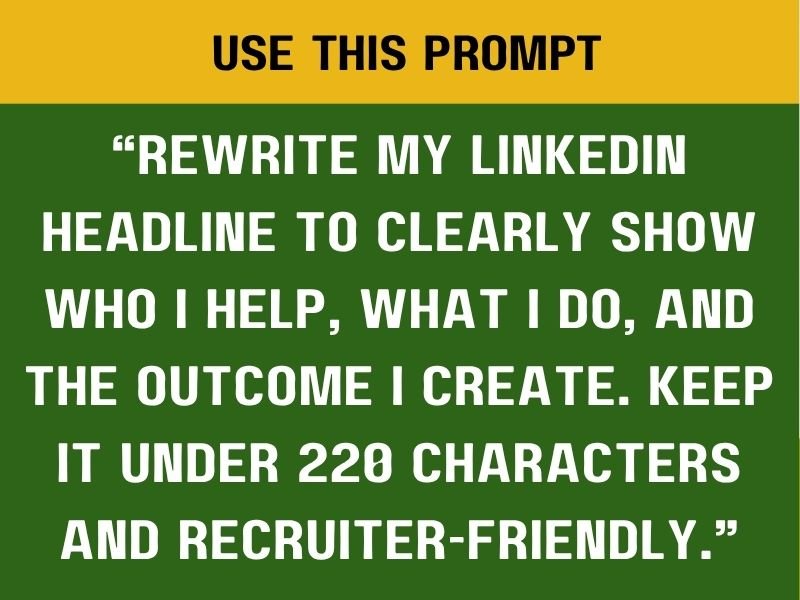
That prompt gives ChatGPT a clear assignment. You are not asking it to make your headline “better.” You are telling it exactly what the headline needs to accomplish. That difference matters. ChatGPT can now focus on your audience, your service or skill, and the value you create. The example in the guide shows what that can look like:
“Marketing Analyst helping brands turn data into profitable decisions | Paid media & performance insights”
Notice what changed. The headline now explains the person’s role. It also identifies who benefits from their work. Most importantly, it communicates the outcome.
That makes the profile easier to understand. If you are developing digital skills to strengthen your profile, you can also explore 10 Skills AI Can’t Replace That You Should Be Learning and choose skills that align with your target career.
Step 2: Rewrite Your About Section for Clarity
Your About section gives you more room to explain your value. Unfortunately, many people waste that space. Instead, many people fill the section with lengthy personal stories, childhood ambitions, and motivational quotes that do little to explain their professional value. Then they add as many buzzwords as possible. None of that answers the question a recruiter actually has:
Why should I care about this person?
The guide recommends a much simpler structure. Check this out next: 8 Powerful AI Prompts you can use for job search Your About section should quickly explain the problem you solve, how you solve it, and the tools or skills you use.
What Most People Do
Life story. Motivation. Buzzwords.
That structure may feel personal. It rarely creates strong professional positioning. Instead, simplify the message.
What to Do Instead
Paste this prompt into ChatGPT:
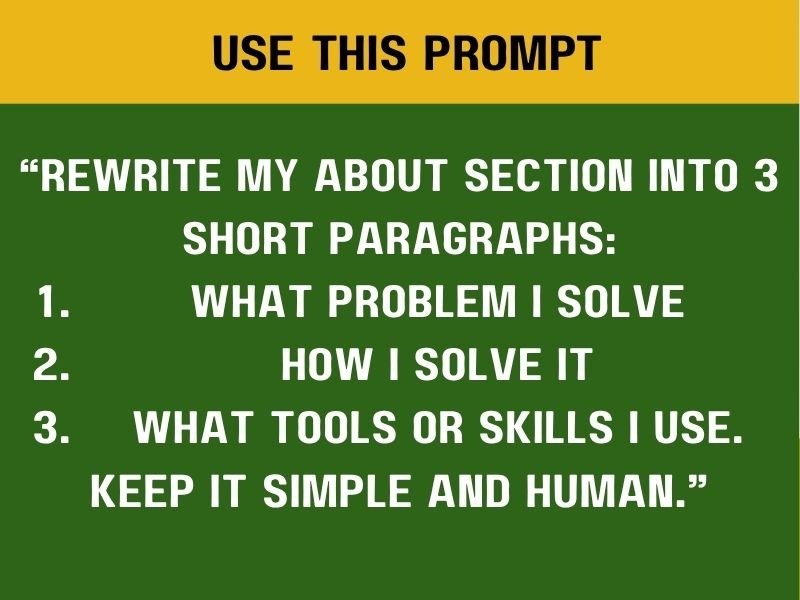
This prompt gives ChatGPT a clear framework. The first paragraph should establish your value. The second should explain your approach. The third should show the skills and tools that support your work.
That structure makes the section easier to scan. It also keeps the focus on your professional contribution.
Why This Structure Works
Recruiters skim. They want useful information quickly. Take a look at this next: 100 Hobbies That Will Turn Your Time Into Money
A short, organized About section helps them find what matters without working through unnecessary details. Imagine your profile says:
“Passionate professional with a strong desire to make a difference. I have always loved helping people and learning new things.” It sounds pleasant. It does not tell an employer much. Now imagine a profile that says:
“I help small businesses improve their online visibility through content strategy and audience-focused marketing. I use research, content planning, and analytics to create campaigns that attract the right customers.”
The second version gives the reader a reason to continue. It explains the problem, the solution and the relevant skills. Avoid stuffing the section with words like “dynamic,” “results-oriented,” “innovative,” and “passionate” when your actual experience can demonstrate those qualities.
If you are building your professional presence for remote opportunities, you can also explore 6 FREE Websites That Gets You Hired FAST to support your job search.
Step 3: Turn Duties Into Results
This is one of the biggest changes you can make to your LinkedIn profile. Many experience sections read like job descriptions. They list tasks. They rarely show impact. Recruiters care about what your work achieved. That means you should move beyond statements that only explain what you were responsible for.
Bad Bullet
“Responsible for managing campaigns”
The sentence describes a duty. It does not show what happened because you managed those campaigns. Think about the results you achieved in that role.
Did you increase engagement, generate leads, improve conversion rates, reduce costs, or successfully manage a specific number of campaigns? Those details show your value.
Use This ChatGPT Prompt
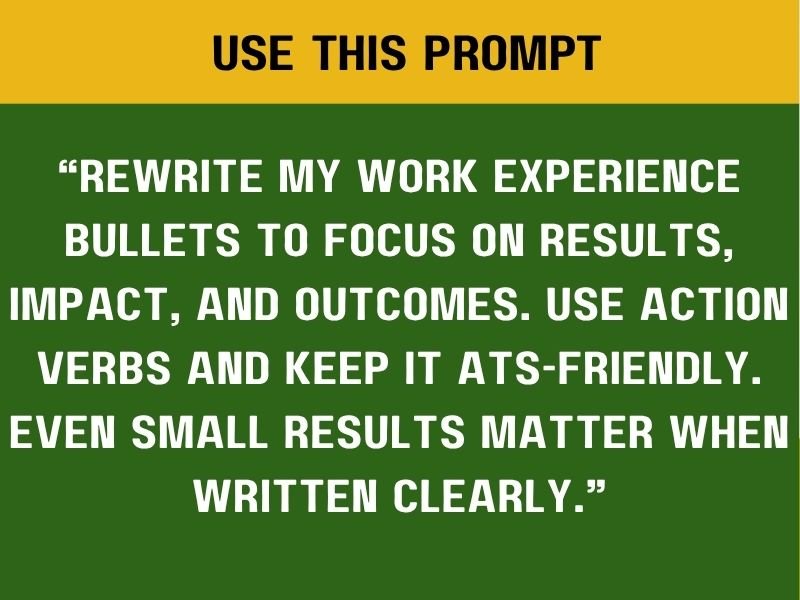
This prompt changes the direction of the rewrite. Instead of asking ChatGPT to make your responsibilities sound impressive, you ask it to reveal the results inside your real experience. That distinction protects your credibility. You should never invent numbers just to make a profile appear stronger. Use actual results whenever you have them. Even small improvements count.
Perhaps you reduced response times. Maybe you handled more customers each month. Don’t miss this helpful guide: 9 FREE AI tools every remote worker should have in 2026
You could have improved organization, increased engagement, supported a larger team, or completed projects faster. Those details matter.
Step 4: Optimize Your Profile for Keywords
LinkedIn functions partly like a search engine. Recruiters type specific terms when searching for candidates. Your profile needs relevant keywords to appear in those searches.
That does not mean filling your profile with random buzzwords. You need keywords that accurately describe your role, skills, tools, and industry.
Use This ChatGPT Prompt
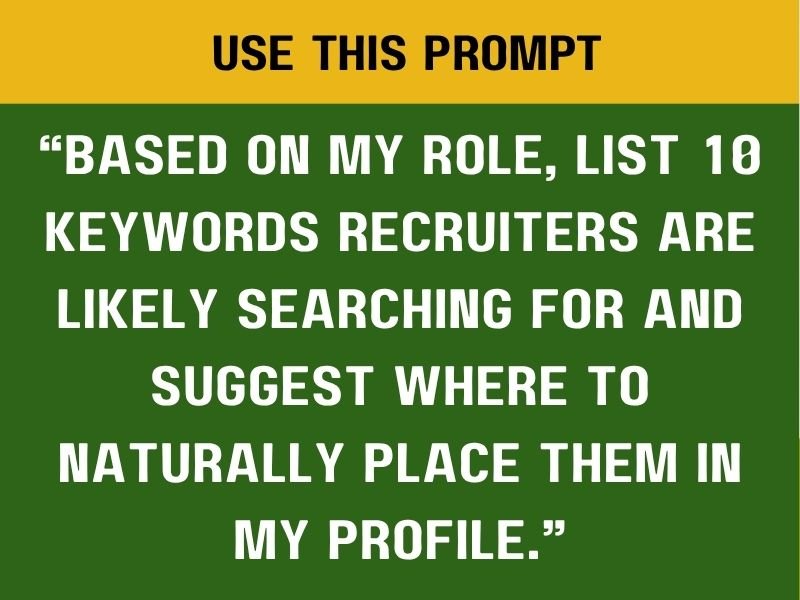
This prompt can save you a lot of research time. ChatGPT can review your role and identify relevant terms. You can then decide which ones genuinely match your experience.
For example, a virtual assistant might discover keywords such as administrative support, calendar management, customer service, email management, project coordination, Google Workspace, and scheduling. A marketing professional may need keywords around content strategy, paid advertising, campaign management, analytics, SEO, and social media marketing.
The important word here is relevant. Do not add a skill simply because recruiters search for it. If you cannot explain or demonstrate that skill, leave it out. Your profile should remain truthful. Read this before you go: 9 Websites that teach you EXCEL courses for FREE
Where Should You Add Keywords?
Use your headline as one key place for relevant keywords, then reinforce those terms in your About section. Work relevant keywords naturally into your experience descriptions, and make sure your skills section supports the same professional focus.
The goal is to create a consistent professional profile. Avoid repeating one keyword in every sentence. That makes your profile sound forced. Instead, use the language naturally while explaining your actual experience. For example, a project coordinator could write:
“Coordinated cross-functional projects, managed timelines, organized stakeholder communication, and tracked deliverables using project management tools.”
That sentence contains useful keywords without sounding like a keyword list. You’ll love this too: 7 Websites To Start Learning Video Editing For FREE
Why LinkedIn Keywords Matter
Imagine two people have almost identical experience. One profile says:
“Marketing professional who enjoys helping businesses grow.”
The other says:
“Marketing Analyst specializing in paid media, campaign performance, audience research, and marketing analytics.”
The second profile gives recruiters more information. It also contains specific terms connected to potential searches. Clear terminology makes your professional identity easier to understand. That is the purpose of keyword optimization. You are not trying to trick LinkedIn. You are helping the right people find you.
Step 5: Fix Your Profile Positioning
The final step focuses on your overall profile. Your profile should quietly communicate:
“I know what I’m doing.”
That message should come from clarity. Not exaggerated claims, long list of certifications or constant self-promotion.
USE THIS ChatGPT Prompt
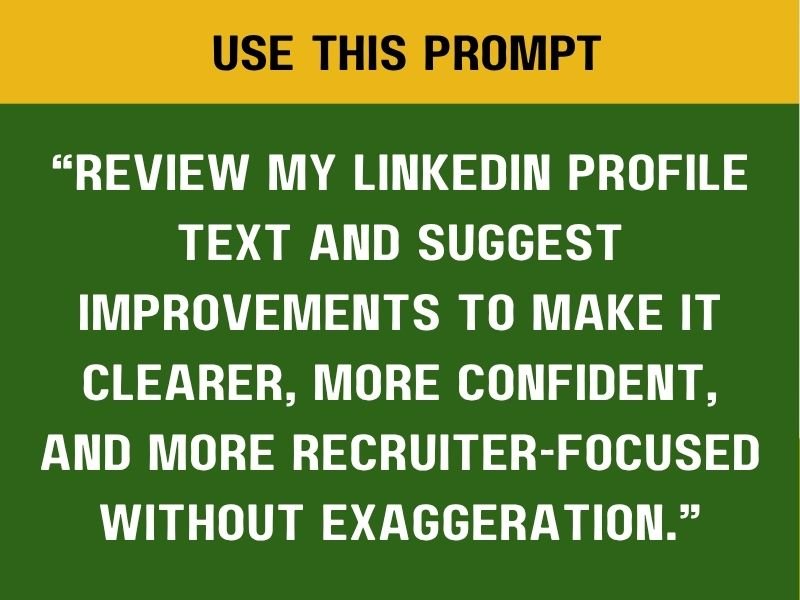
This prompt works because it asks ChatGPT to review the entire message. The previous steps improve individual sections. This step checks whether everything works together.
Your headline may communicate your value, while your About section provides a polished introduction to your professional strengths. Your experience section should support that message with relevant achievements, and your chosen keywords should align with the role you want to pursue.
Yet the profile can still feel disconnected. The final review helps identify those inconsistencies. Explore this related post: 10 APPS that teach tech skills for FREE
What Should ChatGPT Look For?
Have ChatGPT check whether your target role comes across clearly, identify vague statements, remove repetitive language, flag unnecessary buzzwords, point out missing evidence, and assess how quickly your profile communicates your value. Then review every suggestion yourself.
Do not accept every AI recommendation automatically. Your professional story belongs to you. Keep reading for more ideas: 20 FREE Resources to Learn Cybersecurity
ChatGPT should help you communicate it.
Your Profile Needs a Clear Direction
One of the biggest LinkedIn mistakes is trying to appeal to everyone. A profile might say:
“Marketing | Customer Service | Data Entry | Virtual Assistant | Graphic Design | Social Media | Administrative Support | Entrepreneur.”
That creates confusion. A recruiter may struggle to understand which role you actually want.
You can have multiple skills. Your profile still needs a primary direction. Think about the type of opportunity you want next. Then organize your profile around that goal. A person targeting virtual assistant jobs should lead with administrative and organizational strengths. Someone pursuing data analysis should emphasize analytics, reporting, Excel, SQL, and data interpretation.
A project management candidate should highlight planning, coordination, stakeholder communication, timelines, and project delivery. Your other skills can remain visible. They should not compete with your main professional identity.
Discover more here: 8 Skills To Aggressively Learn And Focus On If You Are In Your 30s
Turn Everyday Work Into Evidence
Consider a simple example. You may have written social media posts as part of your job. That duty alone tells recruiters very little.
You might instead describe the result:
“Created social media content that increased engagement and supported monthly promotional campaigns.” That statement gives the reader more context. A stronger version becomes possible when you know the actual numbers:
“Created social media content that increased monthly engagement by 32% and supported promotional campaigns across three channels.” Now the reader sees measurable impact. The key is honesty. Use real results.
Do not allow ChatGPT to manufacture achievements that you cannot verify. This is worth a look: 6 Powerful Chat GPT Prompts to help reduce your workload
Action Verbs Make Experience Stronger
Weak phrases often start with:
“Responsible for…”
“Worked on…”
“Helped with…”
“Was involved in…”
These phrases make your contribution sound smaller. Use stronger action verbs that accurately reflect your work.
You might use:
“Managed.”
“Developed.”
“Coordinated.”
“Improved.”
“Created.”
“Analyzed.”
“Implemented.”
“Organized.”
“Supported.”
“Streamlined.”
Choose verbs that match what you actually did. Then connect them to outcomes. That combination creates a much stronger experience section.
Continue your journey here: Step by Step Guide on How to Start Affiliate Marketing in 2026
Your LinkedIn Profile Should Tell One Clear Story
Your headline, About section, and experience section should support each other. The headline introduces your value. The About section explains it.
Your experience provides evidence. That creates consistency. A recruiter should not see one career identity in your headline and a completely unrelated story in your experience.
Keep the positioning focused. Suppose you want marketing roles. Keep your LinkedIn profile focused on one clear career direction.
Your headline should reflect your marketing expertise, while your About section should explain the strengths you bring to that field. Use your experience section to highlight marketing-related results, then make sure your skills reinforce the same professional direction.
That creates a profile that makes sense. A clear profile can also support other platforms you use during your job search. For example, after improving your LinkedIn presence, you can use 10 Skills AI Can’t Replace That You Should Be Learning to expand your professional reach.
Do Not Keep Changing Your Job Title Just to Look Better
The images emphasize a common misunderstanding. LinkedIn optimization does not require inventing a new job title. You do not need to call yourself a “Business Growth Strategist” because it sounds more impressive than your actual title. Accuracy matters. Use your real title when appropriate. Then explain the value you created through your experience and positioning.
For example, an actual title such as “Marketing Assistant” can become more compelling when the description shows that you supported campaigns, analyzed performance, improved content workflows, or helped increase engagement. Your title identifies your role. Your achievements demonstrate your value. Those two things work together.
You Do Not Need More Certificates to Fix a Weak Profile
People often respond to poor visibility by collecting more qualifications. Another certificate gets added. Then another. The profile becomes longer but not necessarily clearer. Certificates can help. They cannot replace positioning.
A recruiter may see ten certifications and still wonder what you actually do. Start by fixing the message. Make your expertise obvious. Then add credentials that genuinely support your career direction. This approach can save you time, money, and unnecessary pressure.
If you are building new career skills, SMART ways to find clients on X (twitter) and get hired FAST can help you add relevant AI knowledge without losing focus on your primary professional identit.
What a Strong LinkedIn Profile Should Communicate
A recruiter should quickly understand four things. A strong LinkedIn profile should make it easy for recruiters to understand what you do, who you help, and the results you deliver. It should also make your desired career direction clear, so they know exactly what type of opportunity you are seeking. A clear profile makes the recruiter’s job easier.
It also makes you feel more confident because your professional story finally makes sense. That confidence comes from preparation. Not hype.
Use ChatGPT as an Editor, Not a Replacement for Your Experience
AI can improve wording, identify patterns, suggest keywords and restructure content. Your actual experience still provides the substance. Never ask ChatGPT to invent achievements or create fake metrics. Avoid claiming tools you have never used, and never add qualifications you do not actually possess.
Instead, give ChatGPT accurate information and ask it to communicate that information more effectively. That approach produces a stronger and more trustworthy profile.
It also gives you content you can confidently discuss during interviews. If you’re improving your resume at the same time, 6 Powerful Chat GPT Prompts to help reduce your workload can help you apply the same principle to your CV.
Final Thoughts
Learning how to optimize your LinkedIn profile using ChatGPT does not mean turning your profile into an AI-generated sales page. It means making your professional value easier to understand.
Fix your headline. Clarify your About section. Turn duties into results. Add relevant keywords. Strengthen your positioning. Then remove anything that sounds exaggerated or unclear. The strongest LinkedIn profile does not beg for attention.
It attracts the right attention because the message makes sense. You do not need a new career identity. You need clearer communication. Use ChatGPT to help you find that clarity, then make sure the final profile still sounds like you.







4 Comments